JavaScript Array Methods

Syed Jabeed is a Fullstack Developer, but majors in Frontend engineering.
I'm always eager to learn new things and expand my skillset, and I enjoy sharing my knowledge with others.
What is an Array?
In javascript, an array is a container that stores multiple values at a time. In general, to store values we use variables but variable stores one value at a time. An array is a special variable that stores multiple values of different data types in javascript.
for example, let's assume we need to store 2 students' names. With the help of variables, we can easily create two variables and store them in that particular variable. But imagine we need to store 10 students' or 20 students' names, creating 20 variables consumes a lot of time. Since an array comes into the picture to solve this problem. Creating a single array can easily store all the students' names.
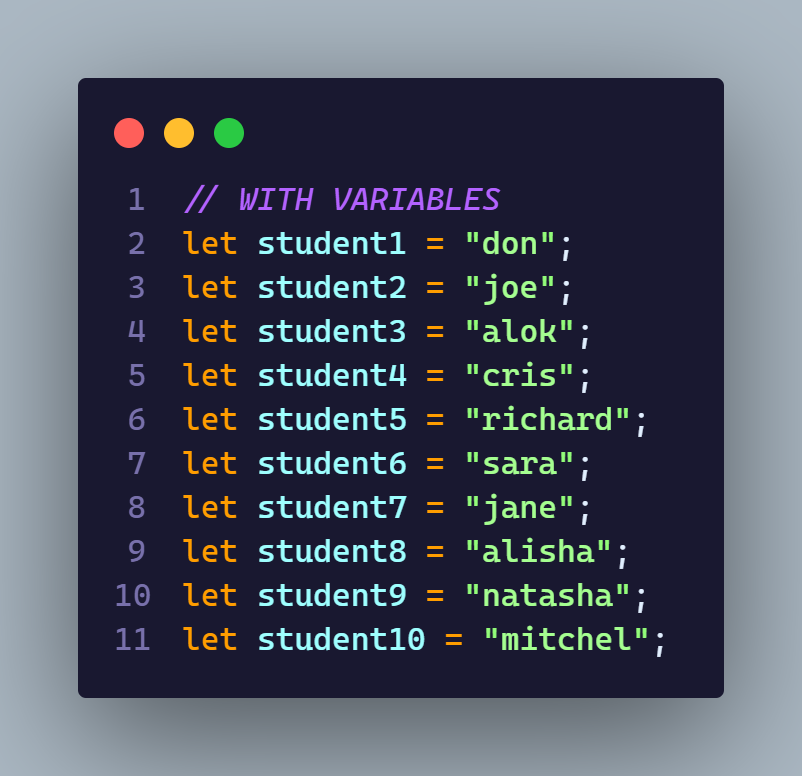

Array definition?
Definition: An array is a non-primitive or reference data type that stores the multiple values of different data types in javascript.
creating an Array?
In javascript, an array can be created in two ways they are,
using an array literal
using the javascript keyword new
// Array can be create in two ways
 1. const students = ['sara', 'john', 'smith']
 2. const cars = new Array('sara', 'john', 'smith');
Type of an Array?
An Array is a type of object. In simple words, every Array is an object.
Javascript Array methods
- push ()
The push () method is used to add a new element to an array. The push() method adds the element at the end of an array
//Push method
const languages = ['javascript', 'cpp', 'typescript'];
languages.push('java');
console.log(languages);
//Output:
['javascript', 'cpp', 'typescript', 'java']
pop ()
The pop() method is used to remove existing elements from an array. The pop() method will remove an element at the end of an array
//Pop method
const languages = ['javascript', 'cpp', 'typescript'];
languages.pop();
console.log(languages);
//Output:
['javascript', 'cpp']
unshift ()
The unshift() method adds the element at the beginning of an array.
//unshift method
const languages = ['javascript', 'cpp', 'typescript'];
languages.unshift('java');
console.log(languages);
//Output:
['java', 'javascript', 'cpp', 'typescript' ]
shift ()
The shift() method removes the element at the beginning of an array.
//shift method
const languages = ['javascript', 'cpp', 'typescript'];
languages.shift();
console.log(languages);
//Output:
['cpp', 'typescript']
forEach ()
foreEach method is a looping method that iterates through all the elements in an array. instead of for loop, we can use forEach method.
 //forEach
 const languages = ['javascript', 'cpp', 'typescript'];
 languages.forEach((x)=>{
 console.log(x)
 })
 //output
 javascript
 cpp
 typescript
Spread operator
The Spread Operator expands an array into its elements. It can also be used for object literals. It only requires three dots… before the array name while consoling.
Example:
Let’s say you want to show a list of favorite dishes without creating a loop function. Use a spread operator like this
 //Spread Operator
 const dishes = ['butter chiken', 'dal', 'panna cotta']
 console.log(...dishes);
 //output
 butter chiken dal panna cotta
for of ()
for of method is also used to iterate through the array elements. It is used for looping and it provide the ability of modification.
//for Of()
const languages = ['javascript', 'cpp', 'typescript'];
for(const x of languages){
 console.log(x)
}
//output
javascript
cpp
typescript
includes ()
The includes() method is used to check if a specific string exists in a collection or not and it returns a boolean.
//includes()
const languages = ['javascript', 'cpp', 'typescript'];
const js = languages.includes('javascript');
console.log(js)
//output
true
filter ()
filter() method is simply used to filter an array. filter () method will return a new array without modifying the existing array.
Example: let's assume you want to return marks that or above 35.
//filter
const marks = [20, 55, 90, 12, 36, 33]
marks.filter((x)=>{
  return x > 35
})
//output
[55, 90, 36]
Map ()
map () method returns a new array similar to the filter() method but it can modify items.
Example: let's assume you want to double the values of all the elements in an array.
//map() const salary = [10000, 15000, 20000, 25000 ] salary.map((x) =>{ return x * 2 }) //output [20000, 30000, 40000, 50000]reduce()
reduce() method can be used to transform an array into something else, which could be an integer, an object, a chain of promises ( sequential execution of promises), etc. reduce() method returns a single value: the function's accumulated result.
Example: let's assume you want to calculate total fees of four years graduation course.
 //reduce
 const fees = [100000, 125000, 150000, 200000]
 fees.reduce((acc, curr)=>{
   acc= acc+ curr
   return acc
 },0)
 //output
 575000
Happy learning.!!


